The Website Structure a General Contractor Needs to Rank by Service and by Town
A general contractor website ranks by having a real page for each service crossed with each town served. Here is the structure that produces that, step by step.
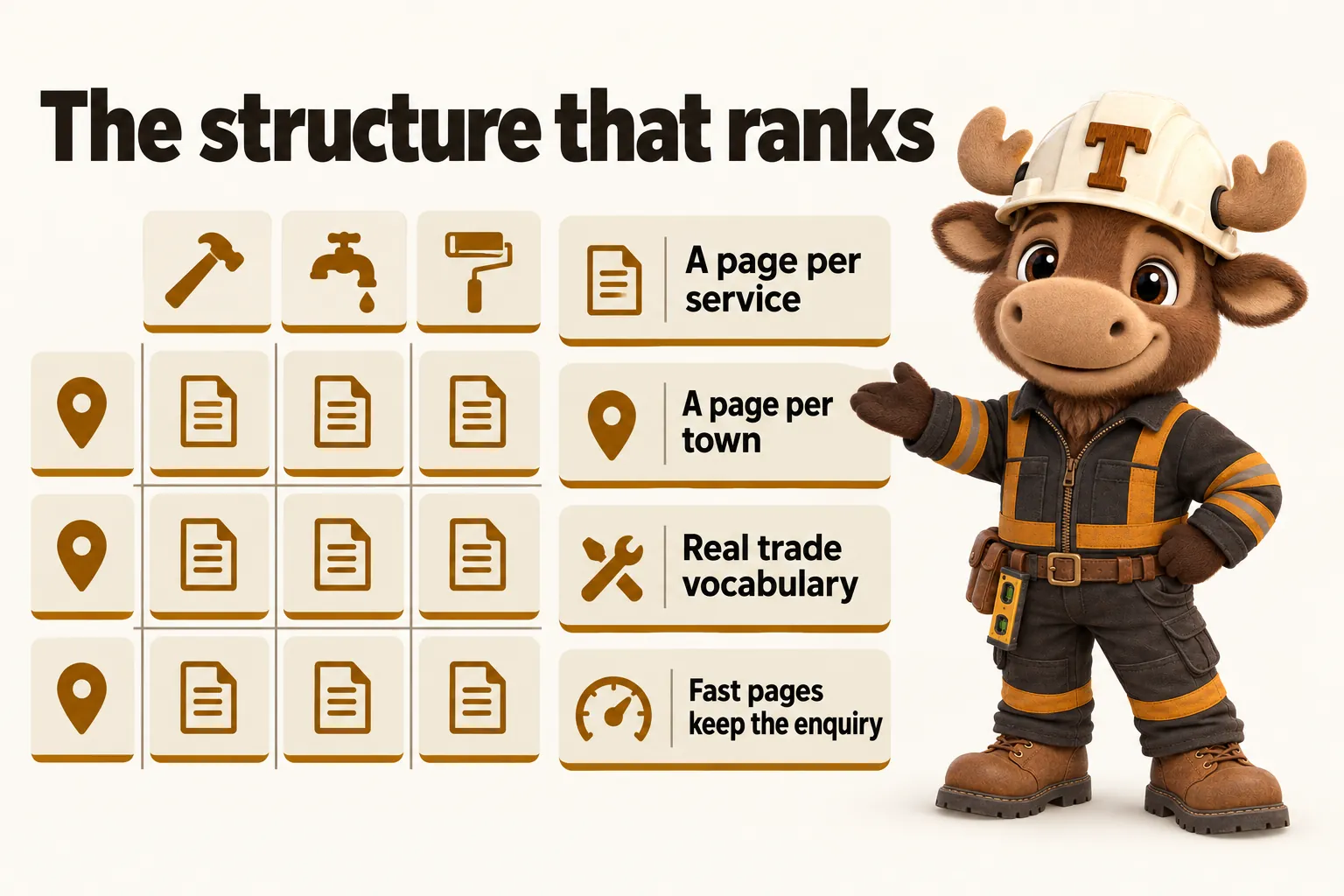
A general contractor website ranks locally by giving search engines and readers a specific page for every service crossed with every town served, rather than a single homepage that tries to describe the whole business at once. That structure, service pages times location pages, is the single highest-leverage change most contractor sites can make, and it is more responsible for local search visibility than any amount of copy polish on a single homepage.
Why a single “services” page holds a contractor’s site back
A homepage that lists “residential and commercial construction services” in one paragraph is trying to be everything to everyone, and search engines read that as a page about nothing in particular. Google’s own guidance on creating helpful, people-first content is explicit that pages should be written to serve a specific reader need rather than covering many topics thinly in one place. A homeowner searching for a kitchen remodel and a property manager searching for a tenant improvement contractor are both potential clients of the same general contractor, but they are searching for different things, reading different vocabulary, and looking for different proof. A single page cannot answer both searches well, and trying to make it do so usually means it answers neither.
The practical result shows up as a site that ranks for the company’s own name and almost nothing else. Traffic comes from people who already know the business, referrals and repeat clients, rather than from someone searching for the specific service the business could win. That is not a failure of the business. It is a predictable outcome of a site structure that never gave search engines anything specific to index.
The service-page structure that actually ranks
One page per scope of work
The fix starts with a page for every distinct scope of work the business bids, not a bullet list under one heading. A general contractor who does additions, kitchen and bath remodels, and new home construction needs three separate pages, each with its own title, its own answer-first opening paragraph, and its own examples. A commercial GC doing tenant improvements, ground-up construction and renovation work needs the same treatment, split along how commercial buyers actually search rather than how the business happens to describe itself internally.
This is not about padding the site with thin pages for the sake of a page count. Each page needs to be genuinely useful on its own: what the scope typically involves, what a client should expect during it, and real examples of completed work in that category. A page that exists only to target a keyword, with no real content underneath the heading, does not perform any better than no page at all and can actively work against the rest of the site.
Writing in the trade’s own vocabulary
Generic language costs a contractor site credibility with the exact readers it needs to convince. A commercial tenant improvement page that talks about “renovating your space” instead of naming build-out phases, tenant coordination and commercial permitting reads as written by someone who does not do the work. Service pages should use the terms a contractor’s own crew and estimators use: scope of work, change orders, punch list, rough-in, permitting, tenant improvements, spec builds. This is not jargon for its own sake, it is the vocabulary the buyer is often already using in their own search, and matching it signals real experience rather than a template filled in with a business name.
Location pages: the multiplier most contractors skip
Service times location, not just a service area line
Service pages solve half the problem. The other half is location: a search for “general contractor” almost always includes, or implicitly means, a place. “General contractor near me,” “kitchen remodel [town name],” and “commercial GC [submarket]” are all location-qualified searches, and a site with no page naming that location has nothing to compete on. A single line in the footer that says “serving the greater metro area” does not give a search engine, or a reader, a page to point to for a specific town.
The fix mirrors the service-page fix: a page per town, county, or submarket the business genuinely serves, crossed with the relevant services. A firm serving four counties with three core services could reasonably support twelve location-service combinations, though in practice a single well-written location page that names the relevant services performs better than forcing every combination into its own thin page. The judgment call is between real usefulness and page count for its own sake, and it should always resolve in favor of usefulness.
What belongs on a location page
A location page earns its place by being specific rather than a copy-paste of the homepage with a town name swapped in. It should name the actual neighborhoods, developments, or permitting jurisdictions the business is familiar with in that area, note anything genuinely relevant to working there, and link to the specific service pages most relevant to that market. Google’s structured data guidance for local businesses points at the same underlying principle: search systems reward pages that clearly and specifically describe where and what a business does, not pages that gesture vaguely at a wide service area.
The project gallery as a ranking and conversion tool
Once a visitor lands on a service or location page, the project gallery is what turns interest into an enquiry. A gallery that groups finished work by service and by scale lets a commercial tenant improvement prospect see tenant improvement work specifically, rather than scrolling past decks and driveways to find something relevant. This matters for conversion, and it also supports the page’s ranking indirectly: a page with real, specific, well-described content around it looks more substantial and more trustworthy to both a reader and a search system than a page with a generic stock photo and three lines of text.
A gallery entry that includes the scope, the rough size or timeline, and a short description of what the project involved gives future visitors, and future search crawls, more real content to work with than a photo alone. This is also where a growing site keeps compounding: as more projects are added over time, described specifically, the site’s evidence of real, current work accumulates rather than staying frozen at whatever existed on launch day.
Getting the enquiry from the page into your CRM
None of the structure above matters if the enquiry it generates gets lost. An estimate request or bid request form should route directly into whatever CRM the business already uses, by a direct API connection, Zapier, or Make, so that a request submitted at night is already a tracked item by the time anyone checks it in the morning. This sounds like an operational detail rather than an SEO one, but it closes the loop on the entire structure: pages exist to generate a specific enquiry, and an enquiry that sits in an unmonitored inbox has the same practical effect as a page that never ranked at all.
How this looks across a real build
Put together, a general contractor’s site structure looks less like a single-digit page count and more like a deliberately organized set of pages: a homepage, an about page, one page per service, one page per town or county served, a project gallery organized by service and scale, and a way to request an estimate or bid that goes somewhere real. None of this needs to exist on day one in its final form. It is exactly the kind of structure that a managed plan is built to maintain over time, with new service and location pages added through ordinary monthly revisions as the business adds a trade or expands into a new county, rather than requiring a redesign every time the company grows.
The exact shape of this structure differs by the kind of contracting work involved. A residential general contractor needs pages built around project types like additions and remodels, paired with the towns served. A commercial general contractor needs the split to run along tenant improvements, ground-up work, and renovation, paired with the submarkets and industrial parks actually worked in. The underlying logic, specific service crossed with specific place, does not change between the two; only the vocabulary and the categories do.
Speed, and why it matters more on a job site
Structure gets a page found. Speed keeps the visitor once they arrive. Core Web Vitals guidance from Google’s own web performance documentation is built around a simple observation: a slow-loading page loses visitors before they ever see the content, regardless of how well that content is written or how well the page is structured to rank. For a general contractor’s site specifically, this matters more than average, because a meaningful share of visits happen from a phone on a job site with a weak signal rather than from a desktop on a fast office connection. A heavy homepage that takes several seconds to become interactive is not a minor inconvenience in that context, it is the difference between an estimate request being submitted and the same visitor calling the next name on their list instead.
This is also where a site’s technical build matters as much as its content structure. A site assembled from a stack of page-builder plugins tends to slow down as more pages, images and form integrations are added over time, which is exactly the direction a growing contractor’s site needs to move. A custom-coded build, by contrast, can add service pages, location pages and a growing project gallery without the same speed penalty, because nothing about the underlying approach depends on plugin count.
Keeping the structure current as the business changes
A site built around this structure is never really finished, and that is by design rather than a shortcoming. A contractor that starts offering a new service, such as a design-build firm adding a dedicated remodeling division, needs a new service page the same week the offering becomes real, not whenever the next site redesign happens to be scheduled. The same is true in the other direction: a service the business no longer offers should be removed or clearly marked as discontinued rather than left live, quietly telling every visitor and search crawler that the business still does something it has actually stopped doing.
Growth into a new county or metro area works the same way. The location-page structure described above is built to expand incrementally: a new town gets its own page when the business is genuinely ready to serve it, written specifically for that place rather than copied from an existing page with the name changed. Treating this as ordinary maintenance, handled through small monthly updates rather than saved up for an occasional overhaul, is what keeps a site’s structure matching the business it actually represents. A site that has not changed in two years reads as a business that has not changed in two years, whether or not that is true, and a stale structure is one of the fastest ways to undercut all the work that went into building it correctly in the first place.
Articles and content that support the structure
Service and location pages give a site something to rank for. Ongoing articles give the site a reason to keep being crawled, and they let it demonstrate real knowledge of the trade over time rather than a fixed snapshot from launch day. An article that walks through how a kitchen remodel timeline typically unfolds, or what a homeowner should expect from a permitting process in general terms, answers exactly the kind of question a prospective client searches before ever searching for a specific contractor by name. Done well, this content links back into the relevant service and location pages, reinforcing the same structure rather than existing as a disconnected blog off to the side.
The discipline that matters here is the same one that applies to service pages: answer the actual question first, cite real information rather than presenting a guess as fact, and be explicit that general guidance is not a substitute for a licensed professional’s estimate on a specific project. Search visibility for a new page, whether a service page, a location page, or an article, typically takes real time to develop rather than appearing immediately, which is exactly why this needs to run as an ongoing habit rather than a one-time project completed before launch and then left alone.
What to do if the site already exists
A contractor with an existing site rarely needs to start from zero. The more common situation is a site with some of this structure already, usually a handful of service pages and no location pages, or the reverse, plus a backlog of projects that were never properly documented. The practical path is an audit: which existing pages are worth keeping and expanding, which service and location gaps are the highest priority to fill first, and which old URLs need a permanent redirect to their new equivalent so that whatever search visibility already exists is not lost during the rebuild. Redirect mapping specifically is the step that is most often skipped in a DIY redesign, and it is the single most common reason a redesign quietly loses traffic that the old site had already earned.
Putting it into practice
None of this requires a large team or a long timeline to start. The order of operations that tends to work best is: list every service actually bid, list every town or county actually served, build one page for each, connect the enquiry form to wherever leads should land, and then keep the gallery current as work finishes. A firm doing this for the first time does not need every page perfect before launch. It needs the structure in place, with each page genuinely useful, and a plan for adding to it as the business changes.
For a contractor comparing this against building or rebuilding a site independently, the practical trade-off is time: this structure takes real, ongoing attention to execute well, which is exactly why it is built into every plan here rather than sold as a one-time project. A live walkthrough is the fastest way to see how this structure would look applied to a specific business, with the actual services and towns involved, rather than as a general description.
Sources
Frequently asked questions
How many service pages does a general contractor website actually need?
One page for every distinct service you bid, not one page for the whole business. A firm that does framing, remodels and ground-up commercial work needs at least three service pages, because each is a different search and a different buyer.
Do I need a page for every single town, even small ones?
Yes, for every town, county or metro area you are genuinely willing to serve. A short, accurate page for a smaller town still gives search engines and readers something specific to find, where a single generic service-area sentence gives them nothing to rank.
Will adding all these pages take a long time to build?
Not with a managed plan built around this structure from the start. Service and location pages are part of every plan, built during onboarding and expanded through weekly updates and included revisions as the business grows.
Can a small, single-crew contractor use this structure too, or is it only for larger firms?
It applies at any size. A one-crew remodeling contractor with three services and two towns needs six specific pages, not one broad page, exactly the same logic as a fifty-person commercial GC with a longer list.
Does this replace the need for a project gallery or reviews?
No. Service and location pages are the structure that gets a page found; the project gallery and other proof on the page are what convince the visitor once they arrive. Both matter, and neither substitutes for the other.
Want a site like the one described here? Book a demo with GetConstructionWebsite.